Find photo location with AI
LoadQ helps answer where a picture was taken by combining visual clue extraction with candidate ranking.
Upload an image and let LoadQ use AI-assisted visual reasoning, OCR text, landmarks, architecture, web evidence and map signals to estimate where a photo was taken. Built for images without GPS metadata, screenshots, street photos and OSINT workflows.
Why AI Geolocation
Phones, messengers, social networks and screenshots often remove EXIF GPS data. An AI photo geolocation tool can still analyze what is visible in the image: signs, text, storefronts, roads, buildings, vegetation, terrain and other contextual signals.
LoadQ helps answer where a picture was taken by combining visual clue extraction with candidate ranking.
Image geolocation AI is most useful when the photo has no usable GPS metadata but still shows real-world context.
Results are evidence-based estimates, not magic coordinates. The page and reports explain why a candidate may fit.
How It Works
LoadQ uses AI-assisted analysis to extract scene evidence, connect it with web and map context, then rank possible locations by support strength.
Start with a street photo, travel image, screenshot, building photo, social media frame or investigation asset.
The AI looks for signs, roads, storefronts, architecture, terrain, vegetation, landmarks and region-specific details.
Street signs, shop names, transport labels, languages and municipal text can strongly narrow down the search area.
Visible evidence is compared with web evidence, landmark signals and map context where possible.
Possible countries, cities, neighborhoods or points of interest are ranked by how well the clues align.
The best AI geolocation result shows why it fits and which clues still need human verification.
Clue Types
AI image geolocation works best when multiple independent signals point in the same direction.
Languages, street names, shop signs, municipal phrases and transport labels can reveal a city or region.
Facade styles, roof shapes, windows, street furniture and building density can support a geographic profile.
Lane markings, traffic lights, tram wires, bus stops and road signs can narrow down country or city candidates.
Distinctive buildings, local chains, public signs and recognizable structures can anchor the search.
Climate, trees, mountains, coastlines and urban landscape patterns can help separate plausible regions.
Vehicle types and partial plate context may support regional reasoning when used responsibly.
Lighting, weather and scene context can support a broader hypothesis, especially with other evidence.
Clues become stronger when they can be checked against search, map and location-specific context.
Example Analysis
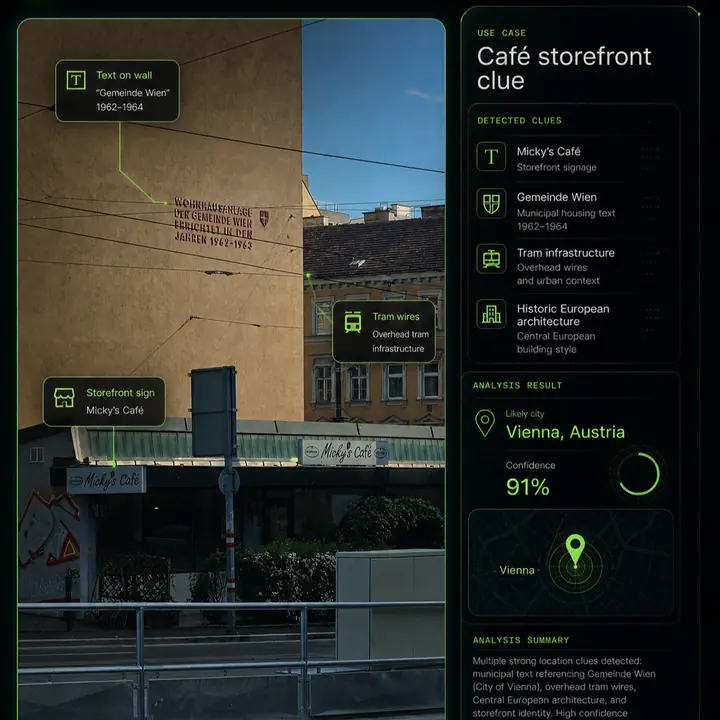
A useful AI photo geolocation result should show an evidence chain, not just a pin on a map.
Compare Methods
Different tools solve different parts of the photo location problem.
EXIF viewers are useful, but many shared images, screenshots and social media photos no longer include coordinates.
Reverse image search can find similar images online, but it may not explain location evidence or rank candidate places.
LoadQ combines visual analysis, OCR, landmarks, web evidence and map context for explainable AI geolocation.
Use Cases
LoadQ is designed for images that contain real-world context and need evidence-based location reasoning.
Extract visual clues faster and document why a location candidate is plausible.
Analyze screenshots and reposted images where GPS metadata has been removed.
Recover likely cities, regions or points of interest from unlabeled images.
Use still frames as geolocation evidence when verifying visual material.
Identify possible places from old images, collections and unlabeled folders.
Learn which image details matter when reading urban and natural scenes.
Accuracy & Limits
LoadQ helps with investigation and verification. It should not be treated as guaranteed exact-address identification from every image.
Related Workflows
AI geolocation connects naturally with broader photo-location, OSINT, reverse-search and guide workflows.
FAQ
AI image geolocation estimates where a photo was taken by analyzing visible clues such as signs, text, architecture, landmarks, roads, vegetation and contextual evidence.
Yes. LoadQ is built for images where GPS metadata is missing or stripped. It uses visual reasoning, OCR and supporting evidence instead.
Accuracy depends on the evidence in the image. Photos with readable signs, distinctive buildings, roads or landmarks support stronger results than generic scenes.
Yes. Screenshots usually lack EXIF metadata, so LoadQ focuses on visible details, OCR text and scene context.
No. Reverse image search looks for matching images. AI image geolocation focuses on explaining location evidence and ranking plausible candidates.
Street signs, storefronts, logos, public transport, architecture, road markings, language, terrain, vegetation, landmarks, weather and shadows can all help.
Upload one image. LoadQ will prepare the photo for AI-assisted location analysis and explain the evidence behind likely candidates.
Keeping the selected photo ready for your workspace...
Creating the handoff into New Case...
Sign up to save the case and open New Case...
Review settings and launch from New Case...
Your image is prepared. Sign up to start one free preview.
Sign up free to review settings, start the real analysis and save your case. No credit card required.