.png)
Q exampleVisual clues to lead
LoadQ is an AI photo geolocation tool that helps find where an image was taken using visible clues, OCR text, metadata, landmarks and map evidence.
Upload an image. Q will look for where it was taken.
JPG, PNG or WebP
Choose a photo
or sample image.
Q reads clues
and researches them.
See likely places
with evidence.
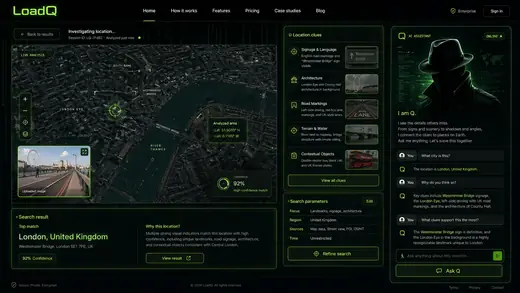
Realistic example screens showing how LoadQ turns scene details into location leads.
.png)
.png)
.png)
.png)
.png)
.png)
.png)
LoadQ keeps the flow simple: you add a photo, Q researches the evidence, and you get ranked location leads.
Start with any JPG, PNG or WebP photo you want to locate.
Q uses vision models, multiple LLMs and autonomous research to compare clues.
Review likely places with confidence, evidence and the reasoning behind them.
Q is a self-improving agent trained for geolocation. It does not just describe photos; it investigates them.
Q checks signs, objects, architecture, roads, vegetation and scene context.
Several models are combined so Q can compare hypotheses instead of guessing once.
Q searches for matching context and checks leads against external evidence.
Q is built to learn from case patterns and sharpen future location searches.
Explore LoadQ pages built around the main ways people search for photo locations: AI geolocation, OSINT research, reverse image location search and practical guides.
Premium is a monthly or annual subscription. Token packs are one-time top-ups. Quick scans cost 3 Tokens. Deep Q investigations cost 5 Tokens.
For active investigators who want recurring capacity and full exports.
Best value for regular casework across the year.
One-time Token top-up for a small case.
One-time Token top-up for regular photo-location work.
One-time Token top-up for larger investigations.
For higher volumes and specialist support.
Create a free web account, keep your uploaded photo, and start one locked preview. No subscription or credit card required.
Practical guides for reading visible clues, working without GPS metadata, checking reverse image search results and verifying likely photo locations.
Nine practical methods: EXIF, OCR text, signs, landmarks, reverse image search, maps and AI-assisted analysis.
How to work with screenshots and shared images after metadata has been stripped.
A structured process from visual clues to verified location candidates.
Signs, roads, architecture, vehicles, terrain and vegetation as practical evidence.
How to move beyond similar-image matches into location-specific verification.
What affects confidence, when AI helps and when the evidence is too weak.
Use OCR, platform overlays, source context and map checks when EXIF GPS is unavailable.
Read photo coordinates correctly, detect missing metadata and verify GPS against the scene.
Learn when Lens helps, when reverse search fails and when evidence-based AI analysis is better.
Pick better frames, read OCR, use motion context and verify candidates with map geometry.
Handle captions, location tags, Story overlays and reposts without trusting platform claims blindly.
A repeatable checklist for EXIF, OCR, visual clues, reverse search and map verification.
Short answers for people trying to find where an image, screenshot or shared photo was taken.
LoadQ helps estimate where a photo was taken by analyzing visible clues, OCR text, landmarks, metadata and map evidence.
Yes. LoadQ is designed for screenshots, social images and shared photos where EXIF GPS metadata is missing or stripped.
Useful clues include signs, OCR text, storefronts, architecture, roads, landmarks, terrain, vegetation, vehicles and map context.
No. Reverse image search looks for matching images. LoadQ focuses on location evidence and ranked candidate places from the image itself.
Accuracy depends on the visible evidence. Distinctive signs, landmarks and multiple independent clues support stronger location candidates.
Keeping the selected photo ready for your workspace...
Creating the handoff into New Case...
Sign up or log in to keep this photo ready...
Launch the locked preview from New Case...
Your image is prepared. Sign up to start a free preview.
Create your account, keep this upload, start the free preview, and unlock only if the result is useful.