If you want to find where a photo was taken, start with a simple assumption: the image may not contain one single answer. It may contain a set of clues. Some clues are strong, such as a readable street sign or unique landmark. Others are weak, such as road style, vegetation or building materials. Good geolocation means combining those clues without pretending that one detail proves everything.
This guide is written for practical use. It covers the same evidence categories behind LoadQ: metadata when it exists, OCR text, visual scene details, reverse image search, web evidence and map verification.
| Method | Best for | Main weakness |
|---|---|---|
| EXIF GPS | Original phone or camera files | Often stripped by apps and websites |
| OCR and visible text | Signs, storefronts, transport labels | Requires readable text |
| Landmarks | Recognizable places and skylines | Generic scenes may not have landmarks |
| Reverse image search | Images already indexed online | No match does not mean no location clues |
| Maps and Street View | Verifying a candidate location | You need a candidate before comparing |
| AI-assisted analysis | Combining many weak clues quickly | Still needs human review for important cases |
1. Check EXIF GPS metadata first
01Metadata is the fastest answer when it exists
Original camera and phone files can contain EXIF metadata. Sometimes this includes GPS latitude, longitude, capture time, device model and camera settings. If you have the original file from the camera roll, checking EXIF is the first step.
But do not rely on it too much. Social networks, messengers, screenshots, image editors and compression tools often remove GPS data. A copied image from a website or chat usually has no useful location metadata.
2. Read signs, text and storefronts
02Text is often the strongest visible clue
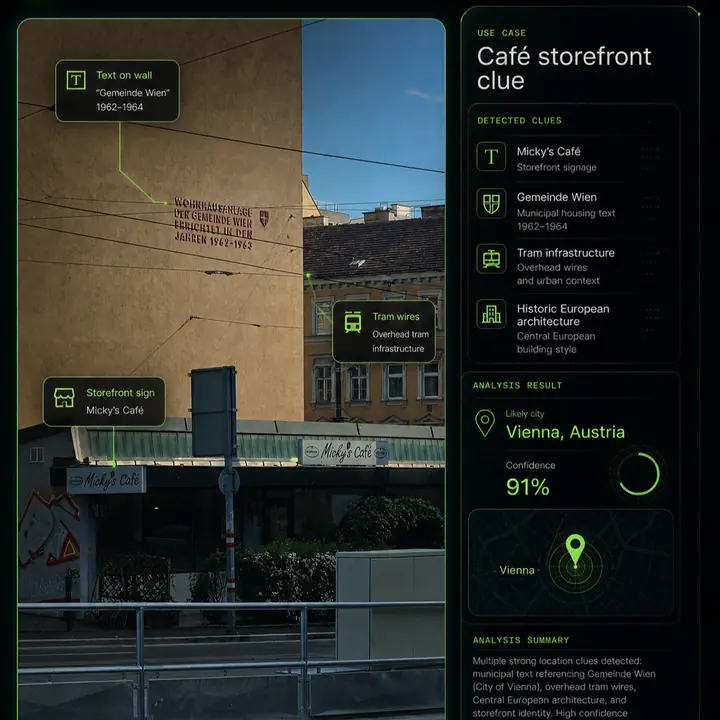
Readable text can narrow a search faster than almost anything else. Street signs, shop names, public transport labels, construction notices, road signs, menus, billboards and municipal wording can point to a language, city, region or exact business.
Use OCR if possible, but also read manually. OCR can misread stylized letters, small text or partially hidden signs. Search exact phrases in quotes. If the phrase is local or official, it may lead directly to a municipality, agency or street.
3. Look for landmarks and skyline features
03Distinctive structures can anchor a location
Bridges, towers, mountains, monuments, stadiums, train stations, coastlines and unusual skyline shapes can turn a broad guess into a testable candidate. The best landmark clue is not always the largest object. Sometimes a smaller building outline, church tower or bridge railing is more unique.
When checking landmarks, compare shapes and relative positions. A tower in the background may look similar to many towers. A tower plus a hill line, road curve and waterfront is much stronger.
4. Use architecture and street design
04Buildings reveal region, age and density
Architecture can suggest a country, city or neighborhood type. Look at roof shapes, facade colors, window proportions, balconies, building density, street furniture, sidewalks and road width. These are usually weaker than text, but they are useful when several details agree.
Be careful with old towns, tourist districts and global chains. Many cities share similar architectural patterns. Use architecture to narrow candidates, then verify with stronger evidence.
5. Check roads, transit and vehicles
05Infrastructure can narrow countries quickly
Road markings, lane direction, traffic lights, bus stops, tram wires, pedestrian crossings, bollards and license plate formats can all help. Public transport is especially useful because route colors, signage and vehicle models are often city-specific.
A partial plate or bus design should be handled responsibly. Do not use private identifying details for harassment or stalking. Focus on broad location signals such as plate format, transit agency style or road rules.
6. Compare terrain, vegetation and climate
06Natural context helps eliminate false candidates
Mountains, coastlines, soil color, vegetation, tree species, weather, shadows and terrain can rule places in or out. A tropical coastline, alpine village, dry scrubland or flat northern street scene each suggests different search areas.
This category is useful for eliminating impossible guesses, but rarely enough on its own. Combine it with human-made clues such as roads, signs and buildings.
7. Try reverse image search, but know its limits
07Matching images can help, but matches are not guaranteed
Reverse image search can be useful when the same photo, a cropped version or a visually similar landmark has been indexed online. Google Lens, Bing Visual Search, Yandex and other tools may find related pages or object matches.
The limitation is simple: a private, new, cropped, compressed or screenshot image may not have an indexed match. That does not mean the location cannot be found. It means you need location-focused analysis rather than only similar-image matching. This is the gap covered by reverse image location search.
8. Verify candidates with maps or Street View
08A candidate is not a result until it is checked
Once you have a likely city, road, business or landmark, move into verification. Compare street geometry, building positions, shadows, storefronts, road signs, mountain outlines and camera angle. Map and Street View checks are especially useful because they test whether the scene can physically match the candidate.
Do not only ask, "Can this be the place?" Ask, "What would make this place wrong?" Look for contradictions. A wrong lane direction, missing landmark, different storefront shape or impossible terrain can invalidate a candidate.
9. Use AI-assisted image geolocation to combine clues
09AI is most useful as a reasoning assistant, not an oracle
An AI image geolocation workflow can speed up clue extraction and candidate generation. The useful part is not a one-line guess. The useful part is reading many visible details, ranking possibilities, explaining why candidates fit and showing what needs verification.
LoadQ is built for this kind of workflow. It analyzes visible clues, OCR text, landmarks, web evidence and map context to produce location leads. It should still be used with judgment. For professional OSINT, journalism, safety or legal work, verify the evidence before acting.
Practical rule: one clue can start a hypothesis, but multiple independent clues should support a conclusion. Text plus architecture plus road layout plus map verification is far stronger than any single detail.
Common mistakes when finding photo locations
- Assuming a language equals a country. Multilingual tourist areas and border regions can mislead you.
- Treating one shop logo as proof. Chains and franchises appear in many places.
- Ignoring image age. Street View, storefronts and road layouts change over time.
- Overtrusting reverse image search. No online match does not mean no location evidence exists.
- Chasing exact addresses from weak images. Many photos only support a city or region estimate.
- Using geolocation for harmful targeting. Respect privacy and follow responsible-use rules.
Responsible use matters
Photo geolocation can be useful for travel archives, research, journalism, OSINT verification and training. It can also be misused. Do not use location analysis to stalk, harass, identify private people without a lawful basis or expose sensitive places. Read the LoadQ Acceptable Use Policy before using image geolocation in sensitive contexts.
FAQ
Can I find where a photo was taken without GPS data?
Yes. Many shared images have no GPS metadata, but visible evidence can still support a location estimate. Signs, text, roads, buildings, transit clues, terrain and landmarks are often more useful than metadata.
Can I find the exact address from a photo?
Sometimes, but not always. Exact addresses require unique and verifiable clues such as a business name, street sign, distinctive storefront or matching map geometry. Generic scenes may only support a broad area.
Does reverse image search find photo locations?
It can help if the image or a similar scene is indexed online. But reverse search often identifies objects or similar images rather than explaining the location. Use it as one method, not the whole workflow.
Can screenshots be geolocated?
Yes, if they contain visible clues. Screenshots usually lack EXIF metadata, so OCR text, scene details and map verification become more important.
How accurate is AI image geolocation?
Accuracy depends on evidence quality. Images with readable signs, landmarks and distinctive street context support stronger results than generic indoor, cropped or low-resolution images.
Try the workflow on your own image.
Upload one photo. LoadQ will prepare it for visual clue extraction, AI-assisted review and location candidate ranking.