EXIF is missing
Many images have no coordinates. LoadQ looks at the scene itself instead of relying only on metadata.
Upload a photo and let LoadQ analyze visual clues, OCR text, landmarks, web evidence and map signals to estimate where it was taken. Built for images without GPS metadata, screenshots, street photos and investigation workflows.
The Search Problem
EXIF GPS tags are often removed by phones, messengers, social networks and screenshots. LoadQ is built for the harder case: estimating a location from what is actually visible in the image.
Many images have no coordinates. LoadQ looks at the scene itself instead of relying only on metadata.
Google Lens or reverse image search may find similar images, but they often do not explain where the photo was taken.
LoadQ speeds up clue extraction, web checks and candidate ranking so you can focus on verification.
How LoadQ Works
LoadQ does not claim magic coordinates from every image. It builds a reasoned geolocation analysis from multiple evidence layers.
Start with a street photo, building image, travel picture, social screenshot or investigation asset.
LoadQ identifies text, signs, logos, road markings, architecture, vegetation, terrain and landmark-like details.
Street signs, storefronts, public transport labels and language cues are pulled into the analysis.
Relevant clues are compared with search and landmark signals to build plausible location hypotheses.
Possible cities, neighborhoods, points of interest or coordinates are scored by evidence strength.
The final report explains why the candidate fits and which clues still need manual verification.
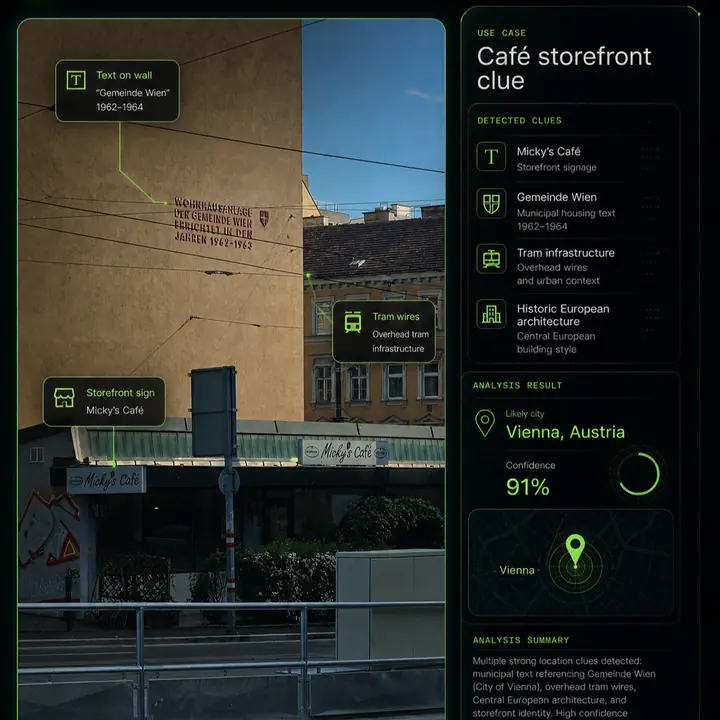
Example Analysis
A strong location result is not just a pin on a map. It should show the evidence, confidence and remaining uncertainty.
Use Cases
LoadQ is most useful when the image contains real-world context but no reliable GPS metadata.
Estimate the country, city, neighborhood or point of interest from visual evidence.
Work with screenshots from social media, videos, chats or news footage where metadata is gone.
Use signs, architecture, logos and storefronts to narrow down a building or street location.
Extract clues faster and document why a location candidate is plausible.
Recover likely places from old images, travel shots or unlabeled folders.
Learn which details matter when reading streets, landscapes and urban environments.
Why LoadQ
Different tools answer different questions. LoadQ focuses specifically on location analysis from image evidence.
EXIF viewers can reveal GPS coordinates, but only if the photo still contains them. Many shared images do not.
Reverse image search can be useful, but matching images are not always indexed and may not include location context.
LoadQ combines visible details, OCR, landmark/web signals and map context into a location-focused investigation.
Accuracy & Limits
LoadQ is designed to help investigation and verification, not to guarantee an exact address from every image.
Related Workflows
Continue from the core hub into AI analysis, OSINT workflows, reverse search and practical guides.
FAQ
Yes. LoadQ is built for photos and screenshots where GPS metadata is missing. It analyzes visible clues such as signs, language, logos, architecture, roads, landmarks and web evidence.
Sometimes. Exact addresses are more likely when the image contains unique landmarks, business names, readable street signs or distinctive storefronts. Generic scenes may only support a city or region estimate.
No. Reverse image search looks for matching or similar images. LoadQ focuses on location reasoning and combines OCR, visual analysis, web evidence and map context.
Useful clues include street signs, storefronts, license plates, road markings, public transport, architecture, vegetation, mountains, coastlines, language, logos and landmark-like structures.
Yes. Screenshots usually lose EXIF metadata, so LoadQ relies on visible evidence and text rather than GPS tags.
Start with one image. LoadQ will extract visible clues, read text, check supporting evidence and explain the most plausible location candidates.
Keeping the selected photo ready for your workspace...
Creating the handoff into New Case...
Sign up to save the case and open New Case...
Review settings and launch from New Case...
Your image is prepared. Sign up to start one free preview.
Sign up free to save your case, review settings, start one free preview and continue when useful. No credit card required.