Reverse image search is often the first tool people try when they want to find where a photo was taken. That is reasonable: if the same image is indexed on a travel page, news article or business listing, the location may be obvious. The problem is that many real investigation images are not indexed. They are screenshots, private uploads, cropped frames, compressed chat images or photos from places that are rarely photographed online.
A useful geolocation workflow treats reverse search as one source of leads. It then checks visible evidence: text, road design, buildings, terrain, landmarks and map geometry. This is why reverse image location search should mean more than uploading an image to one search engine.
| Reverse search result | What it means | Next step |
|---|---|---|
| Exact match | The same image is indexed | Verify source date and location claim |
| Similar scene | A related landmark or object appears | Compare geometry and surrounding clues |
| Object match | The tool recognized a building type or sign | Use it as a search term, not proof |
| No match | The image is not indexed or too altered | Move to OCR and visible clue analysis |
1. Reverse search only sees what is indexed
01No match does not mean no location evidence
Search engines cannot match images they have never indexed. Private photos, new posts, chat images, small towns, low-resolution video frames and cropped screenshots often produce weak results. Continue by reading the scene itself.
2. Similar images can point to the wrong place
02Visual similarity is not location proof
A similar mountain, church, street or storefront may appear in a different country. Treat similar results as candidate generators. Verify with road layout, text, building positions and terrain.
3. Reverse search rarely explains why a place fits
03Evidence chains matter
A useful result should show why the candidate fits: which text was read, which map geometry matches, which landmark aligns and what contradictions were checked.
A better workflow after reverse search
04Move from match hunting to verification
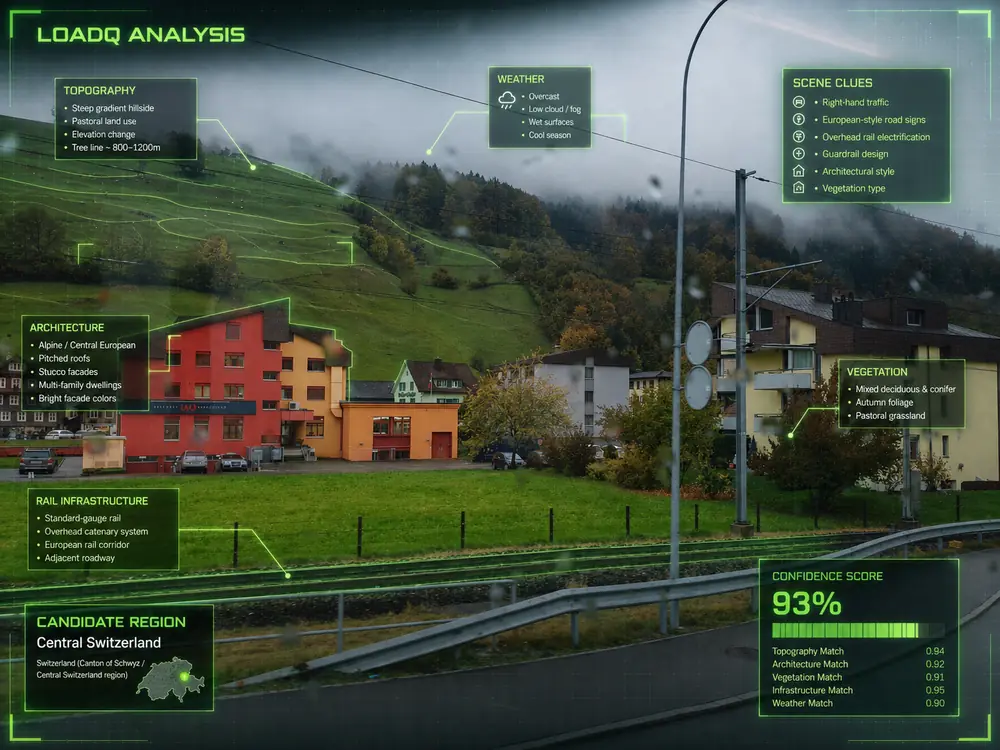
Run OCR, search unique phrases, list visual clues, generate candidates and test them against maps. If a reverse-search result names a place, do not stop there. Check whether the photo viewpoint, surrounding signs, road design and landscape actually match.
Common mistakes
- Assuming no reverse-search match means the location is impossible to find.
- Treating a similar image as the same place.
- Ignoring visible text because the search tool did not read it.
- Trusting a repost that gives no source or date.
- Skipping map verification after finding a named location.
FAQ
Can reverse image search find a location?
Sometimes. It is strongest when the same image or a unique landmark is indexed online.
What if Google Lens finds nothing?
Use visible clues: OCR text, signs, roads, architecture, terrain and source context. Many useful images have no indexed match.
Should I use more than one reverse-search tool?
For important work, yes. Different tools index different images, but every result still needs verification.
Go beyond a similar-image match.
Upload a photo and let LoadQ analyze visual clues, OCR text and candidate evidence.