Photos without EXIF GPS
Social platforms and messengers commonly strip metadata. OSINT image geolocation needs visible evidence, not only coordinates.
Upload a photo, screenshot or video frame and let LoadQ help investigate visible clues, OCR text, landmarks, architecture, web evidence and map context. Built for OSINT researchers, verification teams, journalists and visual investigation workflows.
Investigation Problem
OSINT photo geolocation often starts with a screenshot, reposted image, compressed social media file or video frame. Instead of relying on GPS coordinates, LoadQ focuses on the clues that remain visible in the scene.
Social platforms and messengers commonly strip metadata. OSINT image geolocation needs visible evidence, not only coordinates.
Investigation material often comes from social posts, clips and still frames where metadata is gone but scene context remains.
LoadQ helps extract clues, structure hypotheses and prepare a repeatable investigation workflow.
OSINT Workflow
LoadQ supports an OSINT-style geolocation workflow: extract clues, compare context, rank candidates and verify manually.
Start with a photo, screenshot, social media image, video frame, building shot or street scene.
Identify text, signs, logos, roads, architecture, vegetation, public transport and other location signals.
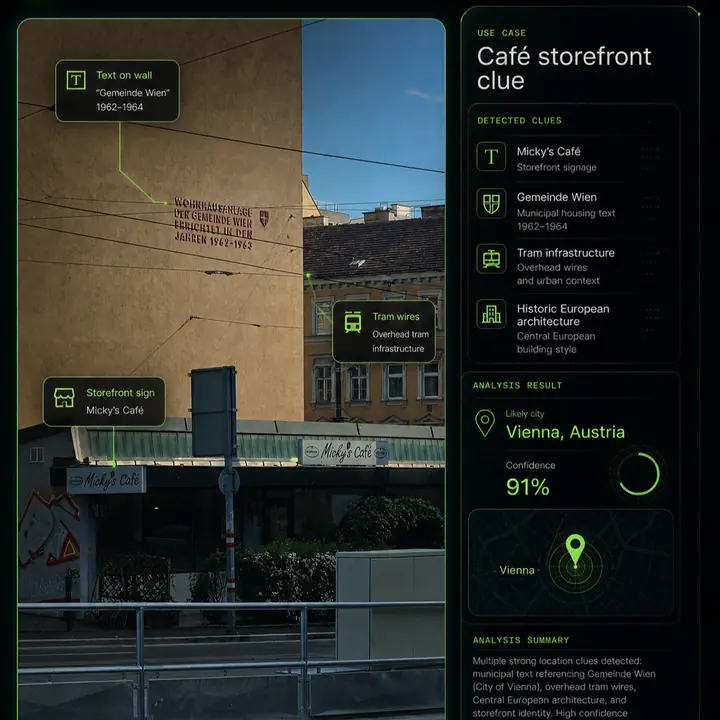
Street names, storefronts, municipal phrases, language and transport labels can quickly narrow the search.
Compare clues with search, maps, landmarks and region-specific context where possible.
Build likely country, city, neighborhood or point-of-interest hypotheses from supporting evidence.
Use the evidence chain to confirm or reject candidates before making conclusions.
Evidence Signals
The strongest geolocation results combine multiple independent clues that point to the same place.
Readable text, alphabets, local phrases and official wording can reveal region and city context.
Business names, local chains and visible branding can become searchable evidence.
Building materials, facades, windows, density and street furniture can support regional narrowing.
Lane markings, tram wires, bus stops, traffic lights and public transport signs can be powerful clues.
Distinctive structures, monuments, bridges and skyline features can anchor a hypothesis.
Climate, plants, mountains, coastlines and landscape patterns can eliminate false regions.
Weather, shadows and seasonal context can support or weaken a location theory.
Candidate places should be checked against maps, street-level imagery and matching scene geometry.
Example Investigation
A good investigation output should show why a location candidate is plausible and what evidence supports it.
Tool Fit
Investigators often need more than metadata or matching images.
EXIF tools can show GPS coordinates, but many OSINT images have no intact metadata.
Reverse search can reveal reposts or similar images, but may not explain the location evidence.
LoadQ combines OCR, visual signals, web evidence and map context into an explainable geolocation workflow.
Use Cases
LoadQ is designed for teams and individuals who need to reason carefully about visual location evidence.
Verify whether images and video frames plausibly match claimed locations.
Extract clues quickly and document the path from image evidence to candidate places.
Review visual material where location context matters and metadata is unavailable.
Build structured cases from screenshots, reposted photos and public imagery.
Recover likely places from unlabeled images and historical collections.
Learn which visual clues matter and how to test candidate locations responsibly.
Accuracy & Limits
LoadQ supports investigation, but it should not be treated as a guarantee of exact location from every image.
Related Workflows
This page connects professional investigation intent with broader image location, AI geolocation and practical guide workflows.
FAQ
OSINT image geolocation estimates where a photo, screenshot or video frame was taken by analyzing visible clues and open-source context.
Yes. LoadQ focuses on visible evidence such as signs, text, roads, architecture, landmarks and map context.
Street signs, storefronts, logos, public transport, road markings, language, terrain, vegetation and landmarks are often valuable.
Yes. Screenshots and reposted images often lack metadata, so visible evidence and OCR become especially important.
No. The goal is to rank plausible candidates and explain evidence. Exact addresses require strong, verifiable clues.
Upload one image. LoadQ will prepare the photo for visual evidence extraction, AI-assisted review and location candidate ranking.
Keeping the selected photo ready for your workspace...
Creating the handoff into New Case...
Sign up to save the case and open New Case...
Review settings and launch from New Case...
Your image is prepared. Sign up to start one free preview.
Sign up free to review settings, start the real analysis and save your case. No credit card required.