No matching image
If a photo is private, cropped, edited or newly posted, reverse image search may return nothing useful.
Upload a photo and let LoadQ go beyond similar-image matching. Analyze visible clues, OCR text, landmarks, architecture, web evidence and map context to estimate the location behind an image, screenshot or street scene.
Search Gap
Google Lens and classic reverse image search are useful when the same image appears online. But many photos, screenshots and compressed social media images have no exact match. LoadQ focuses on location reasoning from what is visible in the scene.
If a photo is private, cropped, edited or newly posted, reverse image search may return nothing useful.
A visually similar image does not always explain where the scene is or why a location candidate fits.
Signs, storefronts, roads, architecture, vegetation and landmarks can still support a reverse photo location search.
How It Works
LoadQ combines image evidence with search-style reasoning to build ranked location candidates.
Start with a street photo, building image, screenshot, travel photo, social post or video frame.
Read signs, storefronts, logos, road markings, public transport, landmarks and environmental details.
Language, street names, shop names and municipal phrases can quickly narrow down the search.
Use searchable clues and landmark signals to find supporting context beyond exact image matches.
Candidate countries, cities, neighborhoods and points of interest are ranked by evidence strength.
Review the evidence chain before treating a candidate as a reliable photo location.
Location Evidence
Reverse image location search becomes stronger when multiple scene details point to the same place.
Street names, storefronts, transport labels and local phrases are often the fastest location signals.
Facades, windows, roofs, street furniture and building density can support regional reasoning.
Lane markings, traffic lights, tram wires, buses and road signs can narrow countries and cities.
Distinctive bridges, towers, monuments, skylines and public buildings can anchor the search.
Local chains, shop names and visible branding can produce searchable web evidence.
Mountains, coastlines, plants, climate and landscape patterns can eliminate wrong regions.
Vehicle styles and partial plate context may support regional clues when used responsibly.
Street layouts, sightlines and object positions can be compared against maps and street imagery.
Example Analysis
A useful result explains the evidence, not just the final candidate.
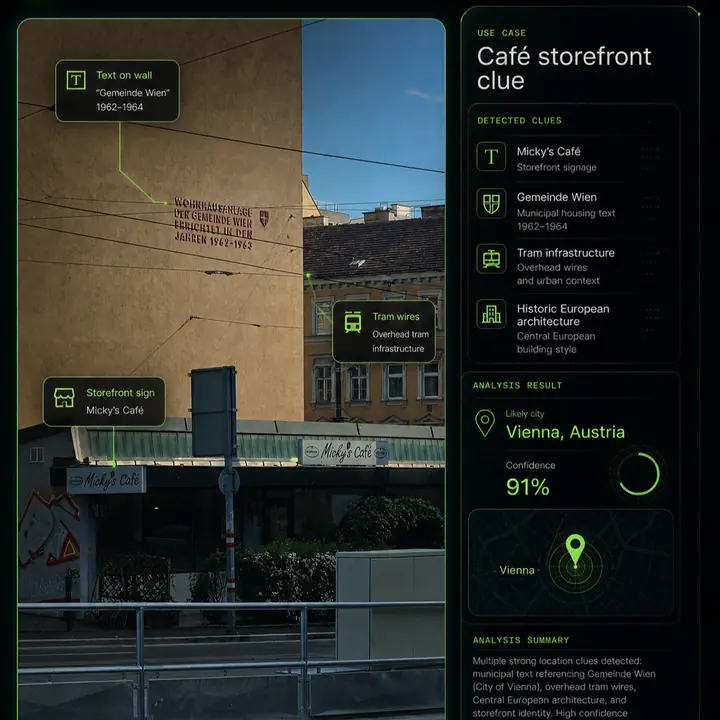
Comparison
Matching an image and locating a scene are related, but they are not the same task.
Lens can identify objects, products and visually similar images, but location reasoning may still be missing.
If no matching copy exists online, basic reverse search may fail even when the scene contains location clues.
LoadQ combines visible clues, OCR, landmarks, web signals and map context to rank likely places.
Use Cases
LoadQ is useful when the question is not just what is in the image, but where it was taken.
Estimate a city, region, neighborhood or point of interest from visible evidence.
Analyze screenshots and social media images where metadata and original source context are missing.
Check whether a photo plausibly matches a claimed location.
Extract clues for manual verification and open-source investigation.
Find likely locations from unlabeled photos, archives and old image folders.
Learn which clues matter when searching for photo locations.
Accuracy & Limits
LoadQ supports investigation and verification. It should not be treated as a guaranteed exact-address finder for every image.
Related Workflows
This hub bridges people searching with Lens or reverse image tools into location-focused analysis and verification guides.
FAQ
Reverse image location search uses a photo to investigate where it was taken by analyzing visible clues, text, landmarks and supporting context.
No. Google Lens can find similar images and objects. LoadQ focuses on location evidence and candidate ranking.
Sometimes. LoadQ can still analyze OCR text, roads, buildings, signs and other scene clues.
Yes. LoadQ is designed for images without usable EXIF GPS data.
Accuracy depends on visible evidence. Distinctive signs, landmarks, storefronts and street context support stronger results.
Upload one image. LoadQ will prepare the photo for visual clue extraction, AI-assisted review and location candidate ranking.
Keeping the selected photo ready for your workspace...
Creating the handoff into New Case...
Sign up to save the case and open New Case...
Review settings and launch from New Case...
Your image is prepared. Sign up to start one free preview.
Sign up free to review settings, start the real analysis and save your case. No credit card required.